Verwaltung von Cookies, die für die Werbung verwendet werden, wie z. B. Anzeigenpersonalisierung, Remarketing und Analyse der Anzeigenleistung.
3.19. Domain tracking
Important points:
- Tracking is only available to registered users.
- Notifications are sent only to the account email.
- Conditions for adding domains to the tracked list:
- The domain must belong to one of the zones in which we support registration (see full list of zones), except Ukrainian ones, for which pre-order is available (for example, .UA, .УКР, and .LVIV.UA domains can be tracked, as pre-order is not available for them).
- The domain must have less than 3 years remaining before it expires.
- The maximum number of domains that can be tracked simultaneously is calculated using the formula "(domains paid with us * 50) + 10". Domains paid with us must meet the following conditions: they belong to the current account, have not expired, and are not marked for deletion.
- The system only notifies about the release of the domain and does not register it.
- After sending the release notification, the domain is removed from the tracked list.
- Domains reserved by the registry are removed from tracking automatically with a corresponding notification sent to your email.
The tracking system allows you to receive notifications about domain releases without automatically registering them.
Add domain to tracked
Registration page
- Log in to your account.
- Open the "Domain registration" section.
- In the search field, enter the name of the desired domain and click 🔍.
- In the menu of the domain you found, select "Notify about release":
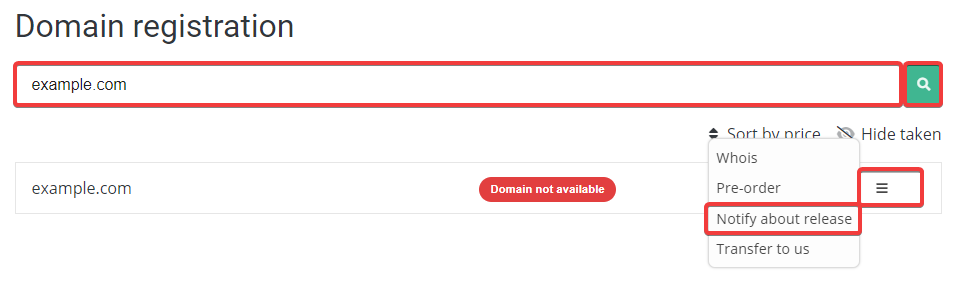
- Click "Confirm".
Control panel
A maximum of 10 domains can be specified in the form at one time.
- Open the "Domain tracking" section.
- In the upper block, specify the desired domains (separated by commas, spaces, or new lines) and click "Track".
List of tracked domains
The list of tracked domains can be found in the "Domain tracking" section: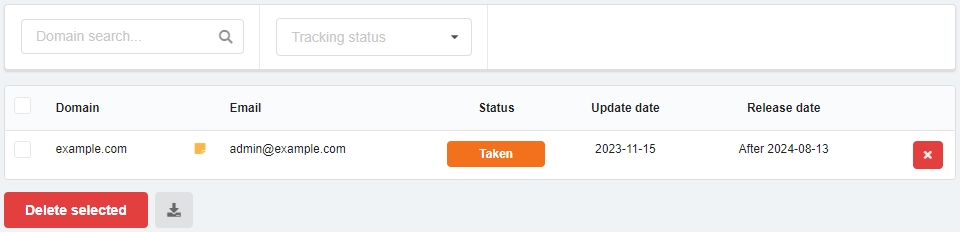
- "Domain" — the name of the domain being tracked.
- "Email" — the email address to which the release notification will be sent.
- "Status" — the current status of the domain.
- "Update date" — the date when the domain information was last updated.
- "Release date" — the date when the domain expires. ⚠️ After this date, the domain does not immediately become available for registration (see Domain lifecycle).
- ❌ — delete the domain from the list and disable notifications about its release.
Buttons below the list:
- "Delete selected" — deletes the selected domains from the list.
- Download button — downloads the list as a TSV (tab-separated values) text file. The list includes: domain name, current status, and release date.