Verwaltung von Cookies, die für die Werbung verwendet werden, wie z. B. Anzeigenpersonalisierung, Remarketing und Analyse der Anzeigenleistung.
2.14.2.12. Localization of Joomla!
- Open the site admin panel.
- Go to the "Extensions → Language(s)" section (in Joomla! 4 — go to the "System → Languages" section).
- Click "Install Languages".
- Find the desired language in the list (you can use the search field) and click "Install" next to it.
- Go back to the "Extensions → Language(s)" section (in Joomla! 4, go to the "System → Languages" section).
- To change the language of the main part of the site:

- Make sure that "Site" is selected in the drop-down list above the language list.
- In the list of languages, set the switch next to the desired language.
- In the row with the desired language, click on the star button in the "Default" column.
- To change the language of the site's admin panel:
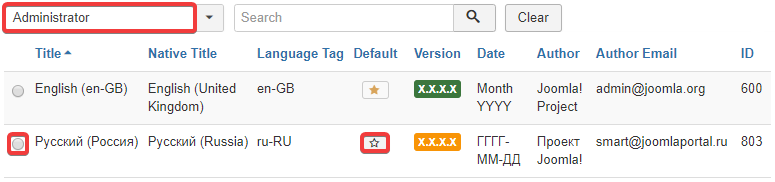
- Make sure that "Administrator" is selected in the drop-down list above the language list.
- In the list of languages, set the switch next to the desired language.
- In the row with the desired language, click on the star button in the "Default" column.